
Introduction
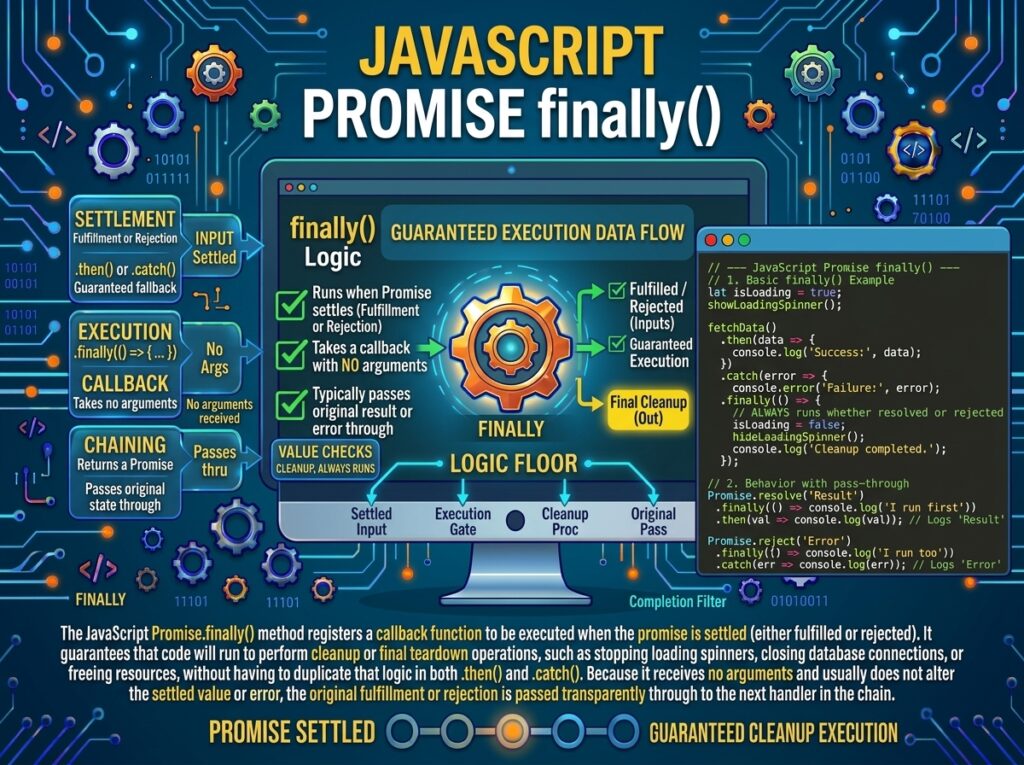
JavaScript Promise finally() Method is available on every promise instance through Promise.prototype. It accepts a callback function and returns a new promise. The callback is executed after the original promise becomes fulfilled or rejected.
If the original promise fulfills and the callback completes normally, the promise returned by finally() fulfills with the original fulfillment value. If the original promise rejects and the callback completes normally, the returned promise rejects with the original rejection reason. In other words, the method normally preserves the original result while allowing a completion callback to run.
The callback is not passed the original value or reason. If you need to inspect a successful value, use then(). If you need to handle an error, use catch(). You can combine these methods with finally() when the program needs both result handling and cleanup.
Syntax of Promise finally()
promise.finally(onFinally);The onFinally parameter is a function that runs after the promise settles. It is optional. If it is not a function, it is treated as a callback that does not perform an action.
The method returns a new promise. This new promise waits for the callback to complete. If the callback returns a promise or another thenable, the returned promise from finally() waits for that asynchronous work as well.
Basic Example of JavaScript finally()
The following example creates a fulfilled promise and attaches a finally() callback. The callback runs after the promise fulfills.
const task = Promise.resolve("Data loaded");

task
  .then((result) => {
    console.log(result);
  })
  .finally(() => {
    console.log("Task finished");
  });
The output is:
Data loaded
Task finished
The then() callback receives the fulfillment value, while the finally() callback receives no arguments. It runs after the preceding promise settles and does not replace the fulfillment value when it completes normally.
Using finally() with a Rejected Promise
The finally() callback also runs when a promise is rejected. This makes it useful for completion logic that must run regardless of the promise outcome.
const task = Promise.reject("Unable to load data");

task
  .catch((error) => {
    console.log("Error:", error);
  })
  .finally(() => {
    console.log("Request completed");
  });
The output is:
Error: Unable to load data
Request completed
In this example, catch() handles the rejection and the following finally() callback runs after that chain has fulfilled. If you attach finally() directly to a rejected promise without handling the rejection, the callback still runs, but the promise returned by finally() remains rejected with the original reason.
How finally() Preserves the Original Promise Result
One important behavior of finally() is that it normally does not change the original promise’s result. When its callback completes normally, the original fulfillment value or rejection reason passes through to the new promise.
For a fulfilled promise:
Promise.resolve(50)
  .finally(() => {
    console.log("Cleanup completed");
  })
  .then((value) => {
    console.log(value);
  });
The output is:
Cleanup completed
50
The callback’s return value is not used as the fulfillment value. The value 50 is passed through to the next then() callback.
The same pass-through behavior applies to a rejected promise:
Promise.reject("Connection failed")
  .finally(() => {
    console.log("Finished checking connection");
  })
  .catch((error) => {
    console.log(error);
  });
The output is:
Finished checking connection
Connection failed
The rejection reason remains "Connection failed" because the callback completed normally. The error can still be handled by a later catch().
finally() Does Not Receive Promise Values
Unlike then() and catch(), the callback passed to finally() does not receive the fulfilled value or rejected reason. This is intentional because the callback is meant to perform work that is independent of the outcome.
Promise.resolve("JavaScript")
  .finally((value) => {
    console.log("Finally value:", value);
  })
  .then((value) => {
    console.log("Then value:", value);
  });
The first log displays undefined because the finally callback receives no argument. The second log displays "JavaScript" because the original fulfillment value is preserved.
If you need the result inside a callback, use then() for fulfillment or catch() for rejection. You can still add a final cleanup step after those handlers.
Using finally() with async/await
The finally() method works with promises created by async functions. An async function always returns a promise, so you can attach finally() to its result.
async function getUser() {
  const response = await fetch("/api/user");

  if (!response.ok) {
    throw new Error("Could not load user");
  }

  return response.json();
}

getUser()
  .then((user) => {
    console.log("User:", user);
  })
  .catch((error) => {
    console.error(error.message);
  })
  .finally(() => {
    console.log("User request finished");
  });
The completion callback runs whether getUser() fulfills or rejects. The catch() callback handles an error, and finally() runs after the preceding chain settles.
You can also use the JavaScript try...catch...finally statement inside an async function. This is a language statement, not the promise method, but it provides a similar cleanup pattern when working with await.
async function loadProfile() {
  try {
    const response = await fetch("/api/profile");

    if (!response.ok) {
      throw new Error("Profile request failed");
    }

    const profile = await response.json();
    console.log(profile);
  } catch (error) {
    console.error(error);
  } finally {
    console.log("Loading process finished");
  }
}

loadProfile();
In this version, the finally block runs after the try or catch block completes. It is useful when the code is already written with async/await and you want a clear cleanup section.
Using finally() to Hide a Loading Indicator
A loading indicator should usually be removed after an asynchronous operation finishes. If the indicator is hidden only in a fulfillment handler, it may remain visible when the request rejects. Adding finally() allows the same cleanup action to run for both outcomes.
function loadProducts() {
  showLoading();

  fetch("/api/products")
    .then((response) => {
      if (!response.ok) {
        throw new Error("Product request failed");
      }

      return response.json();
    })
    .then((products) => {
      displayProducts(products);
    })
    .catch((error) => {
      showError(error.message);
    })
    .finally(() => {
      hideLoading();
    });
}
The loading indicator is hidden after the request chain settles. This keeps the interface cleanup separate from the success and error handling code.
Using finally() with Multiple Promise Handlers
Promise methods can be chained together. A common sequence is to use then() to process a successful result, catch() to handle a rejection, and finally() to perform completion work.
const payment = processPayment();

payment
  .then((receipt) => {
    console.log("Payment successful:", receipt);
    return receipt;
  })
  .catch((error) => {
    console.error("Payment failed:", error);
    throw error;
  })
  .finally(() => {
    releasePaymentResources();
  });
Here, the final callback runs after the preceding chain settles. Notice that the catch handler throws the error again. If a catch handler handles an error without throwing or returning a rejected promise, it converts the chain into a fulfilled promise. That affects the state seen by the following finally(), but the callback still runs in either case.
What Happens When the finally() Callback Throws an Error?
Although finally() normally preserves the original result, a new error thrown by its callback changes the outcome. If the callback throws, the promise returned by finally() rejects with the newly thrown error. This behavior applies even when the original promise was fulfilled.
Promise.resolve("Completed")
  .finally(() => {
    throw new Error("Cleanup failed");
  })
  .then((value) => {
    console.log(value);
  })
  .catch((error) => {
    console.log(error.message);
  });
The output is:
Cleanup failedThe original fulfillment value is not passed through because the callback introduced a new rejection. If the original promise was already rejected, an error thrown by the finally callback replaces the original rejection reason for the returned promise.
What Happens When the finally() Callback Returns a Rejected Promise?
The callback passed to finally() can return a promise. The promise returned by finally() waits for that promise to settle. If the callback returns a fulfilled promise, the original result is preserved. If it returns a rejected promise, the new promise rejects with the returned promise’s rejection reason.
Promise.resolve("Operation completed")
  .finally(() => {
    return Promise.reject("Cleanup operation failed");
  })
  .then((value) => {
    console.log(value);
  })
  .catch((error) => {
    console.log(error);
  });
The output is "Cleanup operation failed". The rejected promise returned by the callback overrides the original fulfilled result. This is important when cleanup itself performs asynchronous work that can fail.
Difference Between then(), catch(), and finally()
The three methods are used at different stages of a promise chain:
then()registers handlers for fulfillment and optionally rejection. Its fulfillment handler receives the resolved value.catch()registers a rejection handler. Its callback receives the rejection reason.finally()registers a completion callback that runs after fulfillment or rejection. Its callback receives no arguments and normally preserves the original result.
Promise.resolve("Task result")
  .then((value) => {
    console.log("Success:", value);
  })
  .catch((error) => {
    console.log("Error:", error);
  })
  .finally(() => {
    console.log("Task settled");
  });
These methods can be combined to keep success handling, error handling, and cleanup logic separate. Remember that the state passed to finally() is the state of the promise immediately before it in the chain. A previous handler may transform a rejection into a fulfillment or create a new rejection.
Difference Between Promise finally() and try…finally
JavaScript has both the promise finally() method and the finally block used with try...catch. They have a similar purpose but belong to different language features.
The promise method is called on a promise instance and returns another promise. It is commonly used in promise chains:
fetch("/api/data")
  .then(response => response.json())
  .finally(() => {
    console.log("Promise chain settled");
  });
The try...finally statement is part of JavaScript’s exception-handling syntax. It runs the finally block after the try block and any catch block, whether the code completes normally or exits by throwing an exception.
try {
  performOperation();
} catch (error) {
  console.error(error);
} finally {
  releaseResource();
}
When using await, a try/catch/finally statement is often a natural way to handle asynchronous errors and cleanup in one function. When using promise chaining, Promise.prototype.finally() provides the corresponding completion handler.
Chaining Multiple finally() Calls
You can attach more than one finally() method to a promise chain. Each callback runs when the promise immediately before it settles. If each callback completes normally, the original result continues through the chain.
Promise.resolve("Report ready")
  .finally(() => {
    console.log("First cleanup step");
  })
  .finally(() => {
    console.log("Second cleanup step");
  })
  .then((result) => {
    console.log(result);
  });
The callbacks execute in chain order. If one finally callback throws or returns a rejected promise, the chain becomes rejected, although later finally callbacks still run as the rejected promise continues through the chain. A later callback that also fails can replace the rejection reason again.
Callback Execution Order in a Promise Chain
Promise callbacks are scheduled as microtasks, so they run after the current synchronous JavaScript code finishes. A finally() callback follows the same promise scheduling rules as other promise handlers. It does not execute immediately at the moment the method is called; it runs when the promise reaches the settled state and its reaction is processed.
console.log("Start");

Promise.resolve("Finished")
  .finally(() => {
    console.log("Finally callback");
  })
  .then((value) => {
    console.log(value);
  });

console.log("End");
The synchronous messages are printed first: Start and End. After the current execution completes, the promise callbacks run. The finally callback runs before the following then handler because it appears earlier in the chain.
This ordering is useful when reading asynchronous code and debugging the sequence of operations. A finally callback may also wait for a promise returned by its own function, so the next handler will not run until that asynchronous callback work has completed.