
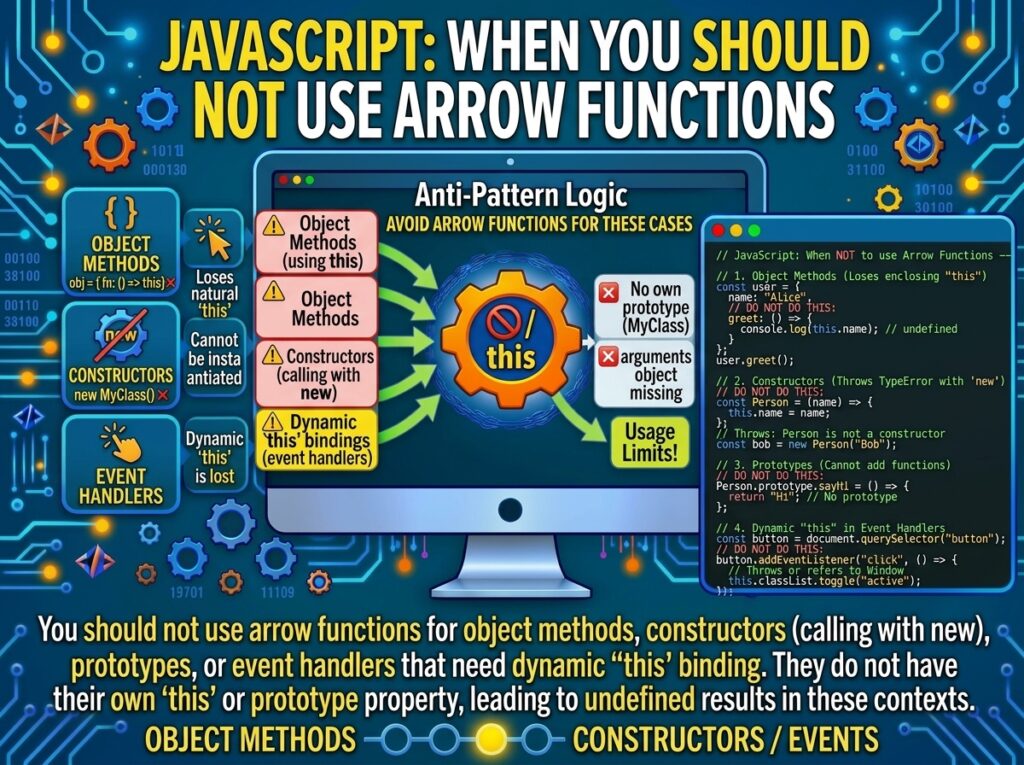
Introduction
When Not to Use Arrow Functions in JavaScript is an important topic for developers who want to write clean and maintainable code.
Arrow functions are one of the most popular features of ES6, and for good reason: their concise syntax and lexical this binding make them ideal for callbacks, functional transformations, and any code where this should come from the surrounding scope. But arrow functions are not a universal replacement for traditional functions. In several specific situations, using an arrow function produces incorrect behavior, silent bugs, or outright errors. Understanding these cases is essential—not just to avoid bugs, but to recognize that arrow functions are a different kind of function, not a shorter form of the same one. This comprehensive guide explores every major situation where arrow functions should be avoided, with detailed explanations and executable examples for each.
Overview: The Cases to Avoid Arrow Functions
The following situations require traditional functions or methods instead of arrow functions:
-
Object methods that need to reference
this(the object). -
Constructors (anything used with
new). -
Prototype methods that need
thisto be the instance. -
Event handlers that need
thisto be the DOM element. -
Functions that use
arguments(they don’t have one). -
Generator functions (arrow functions cannot be generators).
-
Methods that use
superwith their own binding (they inherit, but cannot define). -
Functions that need dynamic
thisviacall,apply, orbind. -
Methods called with
.bind()when the binding is the point. -
Functions whose
thisshould reflect the call site.
Each of these has a specific technical reason. Understanding them turns “avoid arrow functions here” from a rule of thumb into a mental model.
Case 1: Object Methods That Use this
The most common mistake is assigning an arrow function as an object method. Arrow functions do not have their own this—they inherit it from the enclosing scope. When the arrow function is created at the top level of a script, its this may be window, undefined (in modules), or a class instance—never the object literal that contains it.
const counter = {
  count: 0,
  increment: () => {
    // `this` is NOT counter
    this.count++;   // `this` is globalThis (sloppy) or undefined (strict)
  }
};

counter.increment();
console.log(counter.count);   // 0 (increment did not affect counter)
In strict mode (which includes all modules), the arrow function’s this is undefined, and the code above throws a TypeError:
"use strict";

const counter = {
  count: 0,
  increment: () => {
    this.count++;   // TypeError: Cannot set properties of undefined
  }
};

try {
  counter.increment();
} catch (e) {
  console.log(e.constructor.name);   // "TypeError"
}
The Correct Form
Use method shorthand, which provides a proper this binding:
const counter = {
  count: 0,
  increment() {
    this.count++;
  }
};

counter.increment();
console.log(counter.count);   // 1
When an Arrow Method Is Acceptable
An arrow method works if it doesn’t reference this. For example, an object-level helper that only uses its parameters:
const utils = {
  double: x => x * 2,
  triple: x => x * 3
};

console.log(utils.double(5));   // 10
console.log(utils.triple(5));   // 15
The rule is: if the method needs this, do not use an arrow function.
Case 2: Constructors
Arrow functions cannot be used with new. They lack a [[Construct]] internal method and a prototype property. Attempting to construct one throws a TypeError.
const Person = (name) => {
  this.name = name;
};

// const p = new Person("Alice");   // TypeError: Person is not a constructor
The arrow function’s prototype is undefined, so no instance chain can be built:
const arrow = () => {};
console.log(arrow.prototype);   // undefined

function traditional() {}
console.log(traditional.prototype);   // { constructor: traditional, ... }
The Correct Form
Use a class or a traditional constructor function:
class Person {
  constructor(name) {
    this.name = name;
  }
}

const p = new Person("Alice");
console.log(p.name);             // "Alice"
console.log(p instanceof Person); // true
This case extends to any function that might be used with new, including factory functions designed to be subclassed or mixed in.
Case 3: Prototype Methods
When adding methods to a constructor’s prototype, this must reflect the instance. An arrow function assigned to the prototype cannot see the instance:
function Animal(name) {
  this.name = name;
}

// WRONG: arrow function has no `this` binding for the instance
Animal.prototype.speak = () => {
  return `${this.name} makes a sound.`;   // `this` is global/undefined
};

const cat = new Animal("Cat");
console.log(cat.speak());   // "undefined makes a sound." (sloppy) or TypeError (strict)
The Correct Form
Assign a traditional function to the prototype, which gets this from the call site:
Animal.prototype.speak = function () {
  return `${this.name} makes a sound.`;
};

const cat2 = new Animal("Cat");
console.log(cat2.speak());   // "Cat makes a sound."
Modern code uses class methods, which provide the same behavior with cleaner syntax:
class Animal {
  constructor(name) {
    this.name = name;
  }

  speak() {
    return `${this.name} makes a sound.`;
  }
}

console.log(new Animal("Cat").speak());   // "Cat makes a sound."
Case 4: Event Handlers That Need this to Be the Element
In a traditional addEventListener callback, this is the DOM element that fired the event. Arrow functions ignore that binding and use their enclosing scope instead.
const button = document.querySelector("button");

// WRONG: `this` is not the button
button.addEventListener("click", () => {
  console.log(this);   // window or undefined, NOT button
});

// CORRECT: traditional function binds `this` to the element
button.addEventListener("click", function () {
  console.log(this);   // button element
  this.classList.toggle("active");
});
The Modern Alternative: event.currentTarget
Many developers prefer to use event.currentTarget regardless of this, which works with arrow functions:
button.addEventListener("click", (event) => {
  event.currentTarget.classList.toggle("active");
});
This is a legitimate escape hatch: if you use event.currentTarget instead of this, an arrow function is fine. But if you or your codebase relies on this being the element, use a traditional function.
Case 5: Functions That Need arguments
Arrow functions do not have their own arguments object. Referencing arguments inside an arrow function reaches into the nearest enclosing non-arrow function—or throws a ReferenceError if none exists.
const sum = () => {
  let total = 0;
  for (let i = 0; i < arguments.length; i++) {   // `arguments` from enclosing scope or ReferenceError
    total += arguments[i];
  }
  return total;
};

// sum(1, 2, 3);   // ReferenceError (in modules) or reads global arguments
The Correct Form: Rest Parameters
Rest parameters are the modern, idiomatic replacement:
const sum = (...args) => {
  return args.reduce((a, b) => a + b, 0);
};

console.log(sum(1, 2, 3));   // 6
Or, if you genuinely need the arguments object (rare), use a traditional function:
function sumTraditional() {
  let total = 0;
  for (let i = 0; i < arguments.length; i++) {
    total += arguments[i];
  }
  return total;
}
Case 6: Generator Functions
Arrow functions cannot be generators. The yield keyword requires a generator function, which must be declared with function*.
// const gen = () => { yield 1; };   // SyntaxError: Unexpected identifier

function* gen() {
  yield 1;
  yield 2;
  yield 3;
}

console.log([...gen()]);   // [1, 2, 3]
Likewise, arrow functions cannot be async function*:
// const asyncGen = async () => { yield 1; };   // SyntaxError

async function* asyncGen() {
  yield 1;
  yield 2;
}
If you need a generator, use function* (or a method with * shorthand).
Case 7: Methods That Need Their Own super
Arrow functions do not have their own super binding. They inherit the super of the enclosing scope, which is often useful—but it means an arrow function cannot be a class method that defines its own super semantics:
class Parent {
  greet() { return "parent"; }
}

class Child extends Parent {
  // WRONG: class methods must be method syntax, not arrow functions, to define super
  // greetArrow = () => super.greet();   // This works but binds super lexically to Child's field
}
Actually, this case is more subtle. Arrow class fields that reference super do work, and they capture the parent method lexically. The problem arises when you try to use an arrow function as a method inside the class body with the intent of overriding:
class Child extends Parent {
  // This works: class field arrow function inherits super from Child
  greet = () => super.greet();

  // This would be WRONG syntax: you cannot define an arrow as a class method
  // greet() => super.greet();   // SyntaxError
}
More precisely: arrow functions cannot be used as class method definitions—they can only be assigned as class fields. If you need a proper overridable method with super access, use method shorthand:
class Child extends Parent {
  greet() {
    return `child of ${super.greet()}`;
  }
}

console.log(new Child().greet());   // "child of parent"
Case 8: Functions That Need Dynamic this
call, apply, and bind cannot change the this of an arrow function. If your API allows or requires users to pass a this argument to a function, arrow functions break that contract.
const arrow = function () {};       // can be re-bound
const arrowFn = () => {};

const obj = { value: 42 };
const bound = arrow.bind(obj);
const boundArrow = arrowFn.bind(obj);

console.log(bound.call(obj).value);      // 42
console.log(boundArrow.call(obj).value); // TypeError: undefined.value
Real-World Example: A Validation Library
A library that accepts a validator and calls it with a specific this breaks when passed an arrow:
function runValidator(validator, context) {
  return validator.call(context);   // `this` = context for non-arrow
}

const context = { min: 5 };
const arrowValidator = () => this.min > 0;   // `this` = outer scope, NOT context
const traditionalValidator = function () { return this.min > 0; };

console.log(runValidator(traditionalValidator, context));   // true
console.log(runValidator(arrowValidator, context));         // depends on outer `this`
Any code that relies on dynamic this—DOM libraries, some older callback-based APIs, and user-defined utilities—should use traditional functions.
Case 9: Methods Called with .bind()
If the whole point of a function is to be bound with .bind(), an arrow function is the wrong tool because .bind() cannot rebind its this. This overlaps with Case 8 but deserves a distinct example because binding is a common API surface.
const listener = {
  name: "listener",
  handle() {
    console.log(this.name);
  }
};

// Binding a traditional function: works
const boundTraditional = listener.handle.bind(listener);
boundTraditional();   // "listener"

// Binding an arrow function: `this` unchanged
const arrow = () => console.log(this.name);
const boundArrow = arrow.bind(listener);
boundArrow();         // undefined or global `name`
If your code calls .bind() on the callback, use a traditional function.
Case 10: Functions Whose this Should Reflect the Call Site
This is the broadest case and subsumes several of the above. If a function is designed so that its this depends on how it is invoked (as a method vs standalone, or via .call), an arrow function breaks that design because it locks this to the definition site.
The most common instance is duck-typed method borrowing:
const arrayLike = {
  0: "a",
  1: "b",
  length: 2
};

// Borrow Array.prototype methods that use `this` dynamically
const result = Array.prototype.join.call(arrayLike, "-");
console.log(result);   // "a-b"

// This works because join's `this` is set by .call, and join is a traditional method
If you try to replicate this with an arrow function, it fails:
const arrowJoin = (sep) => this.join(sep);   // `this` fixed at definition
// arrowJoin.call(arrayLike, "-");           // does not use arrayLike as `this`